


Runout Poker Trainer GTO Coach
4.6106.00 Reviews
App Specs
- Version
- 1.1.17
- Updated On
- License
- Free
- Downloads
- 50,000+
- Developer
- Learn Poker Offline Labs
- Categories
- Education
- Platform
- Android
Screenshots
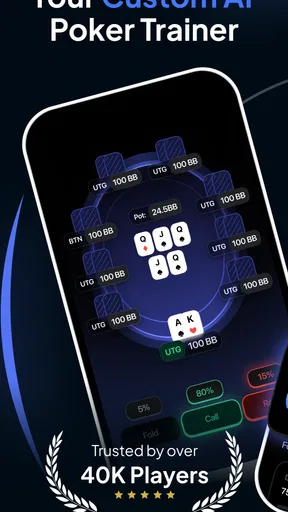
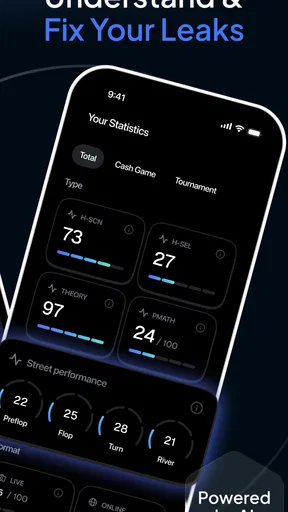
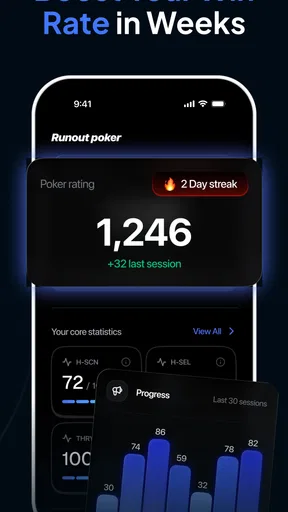
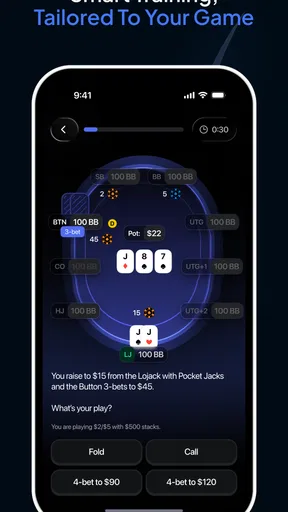
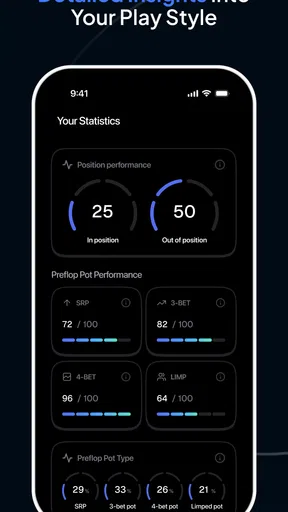
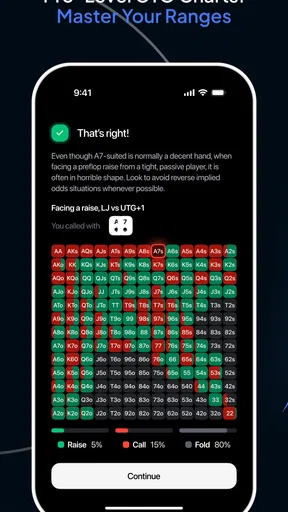
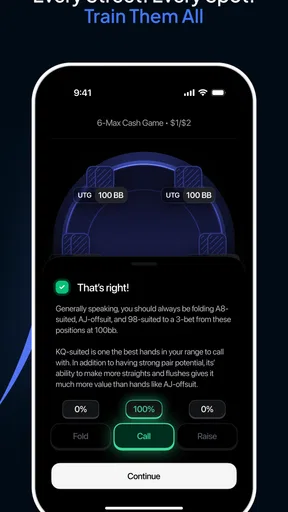
 Analysis by AppCompare
I approached Runout Poker Trainer GTO Coach as a study tool rather than a poker game. Its purpose is to help me practise ranges, think through GTO strategy, and work with odds while an AI training system gives the session structure. That distinction matters: I would not open it expecting a complete poker table, social play, or a replacement for playing real hands. I would use it when I want focused repetition without the noise of a cash game or tournament.
The app sits in the Education category, and that is the right way to judge it. The developer, Learn Poker Offline Labs, has built something aimed at deliberate practice. I found the concept most useful for players who already understand basic hand rankings and betting rounds but still hesitate when decisions become range-dependent. Beginners can learn from it, although someone completely new to poker may need a separate introduction to the rules and vocabulary first.
It is free to install, with optional in-app purchases ranging from around eighteen dollars to around ninety dollars per item. That makes the first step easy, but it also means I would spend time with the free experience before deciding whether the paid options fit my study habits. The app is marked for Teen users, runs on Android seven or later, and version 1.1.17 is the version I considered while testing its place in a poker-learning routine.
How the trainer fits into serious poker practice
I use a serious poker trainer best when I decide what I want to learn before opening it, rather than treating each exercise as an isolated test. In this section, I’ll look at how focused practice can complement videos, hand reviews, and real play, then turn that into a repeatable routine that keeps my own judgment involved.
A focused alternative to passive poker content
Most poker learners move between three common alternatives: videos, articles, and hand-review software. Videos are convenient, but they encourage passive watching. Articles explain concepts carefully, yet they do not always force me to choose an action under pressure. Hand histories are valuable, but reviewing them can become slow and emotionally biased, especially after a frustrating session.
This trainer occupies a useful middle ground. It gives me a decision to consider, which makes the learning active, while the range and odds focus keeps the exercise narrower than a full poker session. I can concentrate on whether a hand belongs in a continuing range, whether a situation deserves a bluff, or whether my instinct is being distorted by the visible strength of my own cards.
The important trade-off is depth versus atmosphere. A real table includes timing, opponents, table image, bankroll pressure, and incomplete information. A training app can isolate a concept much more cleanly, but that isolation may also make the decision feel easier than it would be in play. I see the app as a practice bench, not a complete simulation of poker life.
Worth Reading Before You Choose

EA SPORTS FC Mobile 26 Is a Bigger Football Game, but It Takes Time

Flipboard Shows What News Apps Must Do Beyond the Feed

Switching to Android Auto Means Rethinking Your Driving Routine

Google Calendar Makes a Crowded Week Easier to Manage

Ludo King Makes the Most of the Minutes Between Plans

Baby Panda World Brings Quick Play to Modern Phones, but Its Game Library Feels Busy
What I would practise first
I would begin with short sessions built around one question. For example, I might focus on range discipline rather than trying to improve every part of my game at once. When I use a tool like this, I get more value by identifying the reason behind each choice than by chasing a high score or rushing through repeated prompts.
A practical routine would be to complete a small group of decisions, note the spots that felt uncertain, and then repeat those situations later. The less obvious benefit is that repetition exposes patterns in my thinking. I may discover that I overvalue suited cards, defend too widely, or treat a draw as automatically profitable. Those are more useful discoveries than simply learning that one isolated hand was a fold.
I would also avoid studying only the hands that feel interesting. Poker improvement often comes from ordinary, uncomfortable decisions where folding is correct but emotionally unsatisfying. A trainer built around ranges and odds is especially suitable for that kind of work because it can move attention away from memorable hands and toward consistent decision quality.
Using the AI element without surrendering judgement
The AI training angle sounds most valuable when I treat it as a practice guide, not as an unquestionable authority. If the app presents a recommended line, I still want to understand the conditions that make that line sensible. GTO outputs are shaped by assumptions, and a theoretically sound answer may not always be the best practical adjustment against a particular opponent.
My preferred workflow would be to answer before looking for confirmation, explain my choice in plain language, and only then compare it with the trainer’s guidance. That small pause prevents the app from becoming a guessing game where I simply learn to recognise the expected answer. It also makes the feedback more memorable because I can connect it to my original mistake.
A second useful habit is to separate technical error from emotional error. If I choose incorrectly because I misunderstood pot odds, that requires a different remedy from choosing correctly but changing my mind because the board looked frightening. The trainer can support the practice, but I still have to name the weakness myself.
Trust, controls, and what I can judge as a user
My trust in any learning app starts with visible user choices. Here, the clearest practical choices are whether to install it, how much of the free experience to use, and whether to consider optional purchases. I would review each purchase screen carefully rather than assuming that every training element requires payment. The free entry point lowers the risk of trying the app, but the broad purchase range makes it sensible to decide on a budget before upgrading.
I also pay attention to account controls and data-related screens whenever I install an app. I would look for clear sign-in options, purchase management, and any settings that explain what information is used during training. I do not treat the presence of AI as proof that an app collects more data, and I would not assume that an offline-sounding name guarantees a particular privacy model. The responsible approach is to read the permissions and privacy choices shown on the device and in the app before creating an account or entering anything sensitive.
That is especially relevant for poker players who want to paste in hand histories or describe their own results. I would avoid entering usernames, payment details, private table information, or identifiable opponent notes unless I had a clear reason and understood where that information goes. The safest use is to keep practice examples general and to use the app for decisions rather than as a diary of every personal poker session.
Data-sensitive moments during everyday use
A realistic use case for me would be a ten-minute study break after lunch. I could open the trainer, work through a small set of range decisions, and stop before the exercise turns into distracted tapping. That short format is more realistic than promising myself a long evening of study after a tiring session. It also limits the amount of personal information I feel tempted to add.
Another scenario would be reviewing a recurring leak after playing online. I might remember that I called too often from a marginal position, then use the trainer to practise similar range questions without copying the entire hand history. This keeps the exercise focused while reducing the need to transfer sensitive details from another poker platform.
I would still check the device-level permission prompts rather than granting access automatically. If a permission seems unrelated to practising poker decisions, I would pause and decide whether the app remains worth using without it. That is not a criticism of a specific permission; it is simply a good boundary for an app whose main job is educational practice.
Notifications deserve the same attention. A training reminder can be helpful, but I would disable it if it becomes distracting or reveals my poker activity on a shared lock screen. User agency is not only about accepting or rejecting purchases. It also includes deciding when the app can interrupt me and what information appears outside the app itself.
Who will get the most from it
I think the strongest audience is an intermediate player who knows the mechanics of poker and wants more disciplined decision practice. Someone who regularly asks, “What hands should I continue with here?” or “Am I calling because the price is right, or because I do not want to fold?” will likely understand the value quickly.
It may also suit a learner who studies alone. Without a coach or regular study group, it is easy to consume theory without testing it. A structured trainer gives that player a repeatable activity and a way to expose uncertainty. The app is particularly appealing if the learner prefers short exercises over long articles or lectures.
I am less convinced it is the right first tool for a total beginner. A new player may need visual explanations of positions, betting terminology, hand strength, and basic probability before range training becomes comfortable. Starting with advanced-looking decisions can create confusion rather than confidence. I would learn the fundamentals elsewhere, then use this app once the basic language of poker feels familiar.
It is also not my first choice for a player seeking entertainment. There is no reason to expect the same satisfaction as a full poker game, because the educational purpose comes first. If I want opponents, chips, social interaction, or tournament tension, I would choose a poker game or a live table instead.
Where the experience needs careful handling
The biggest limitation is that GTO study can create false confidence. A player may memorise a preferred action without understanding why it works, then apply it rigidly against opponents who do not play in theoretically balanced ways. I would use the app to sharpen fundamentals and identify leaks, but I would still compare those lessons with actual hand histories and opponent tendencies.
Another point of friction is the potential cost of going beyond the free starting point. Because individual purchases can reach around ninety dollars, I would not buy impulsively after one enjoyable session. I would first establish whether I return to the app regularly, whether the paid material addresses a specific weakness, and whether the purchase terms are clear on the screen where I make the decision.
The Teen content rating also gives me useful context about the intended audience, but it does not turn poker study into risk-free gambling education. The app can teach decision concepts, yet users should keep training separate from wagering and avoid treating improved theory as a promise of profit. I would be especially cautious with younger users and would make sure that any real-money poker activity follows local rules and family expectations.
Finally, a trainer cannot replace feedback from a strong human player in every situation. A coach can ask why I made a decision, spot a recurring emotional pattern, and adapt an explanation to my level. The app is more consistent and convenient, but less personal. For me, the best combination would be independent practice here followed by occasional review with a knowledgeable player.
My practical recommendation before paying
I would test the free portion with a clear goal rather than browsing randomly. For one session, I might focus on preflop range choices. For another, I could concentrate on odds and ask whether I can explain the price of a call before checking the result. If I cannot describe what I am learning, I would not upgrade yet.
I would also keep a small note outside the app with three items: the type of decision I missed, the reason I gave for my choice, and the correction I want to remember. This turns individual exercises into a personal study plan. It is a simple but important improvement because the app can show me practice material, while the note helps me recognise my own repeated habits over time.
Before any purchase, I would check the exact item, the displayed price, and the purchase controls available through my device. I would not assume that a higher-priced option is automatically better for my level. A narrowly targeted resource that fixes one genuine weakness is more valuable than buying everything and using nothing consistently.
My verdict on Runout Poker Trainer GTO Coach
The app has a clear educational identity, and I appreciate that its focus is narrower than a conventional poker game. Practising ranges, GTO ideas, and odds with AI-guided exercises can make study more active than watching strategy content. Its free installation makes experimentation straightforward, while the current 4.6 average from around 4.4 thousand ratings and more than fifty thousand installs suggest that it has found an audience among poker learners.
I would recommend it to an existing poker player who wants regular, structured repetition and is willing to question the answers rather than copy them. I would not recommend paying immediately, using it as a substitute for real-game experience, or treating theoretical guidance as a guarantee of winning. The purchase range deserves careful consideration, and privacy choices should be reviewed directly in the app and on the device before sharing personal material.
My cautious conclusion is positive: this is most useful as a disciplined study companion, not as a complete poker environment. Used in short sessions, with personal notes and sensible attention to permissions, accounts, notifications, and purchases, it can help turn vague poker intuition into more deliberate decision-making. If that is the kind of improvement I am looking for, I would try the free experience first and let consistent use—not excitement on the first day—decide whether it earns a permanent place in my study routine.
Pros
- Focused GTO drills help build stronger preflop and postflop habits.
- Useful feedback makes it easier to identify recurring strategic mistakes.
- Short training sessions fit well into quick study breaks.
- Covers decision-making practice without requiring real-money play.
- Helpful for comparing your choices with theoretically sound lines.
Cons
- GTO recommendations can feel difficult for beginners without poker fundamentals.
- Some training features may require a paid subscription or in-app purchase.
- Solver-based advice may not match the best exploitative play at every table.
- Repetitive drills could become monotonous during extended practice sessions.
- A stable internet connection may be needed for certain app features.
FAQs for Runout Poker Trainer GTO Coach
What is Runout Poker Trainer GTO Coach?
Runout Poker Trainer GTO Coach is a poker training app designed to help players study post-flop decision-making through game-theory-oriented exercises. It focuses on analyzing runouts, ranges, betting situations, and strategic responses rather than providing a platform for playing real-money poker. The app is intended for players who want structured practice and a better understanding of theoretically sound poker decisions.
Is Runout Poker Trainer GTO Coach suitable for beginners?
The app can be useful for beginners, but it may feel demanding if you are unfamiliar with poker terminology such as ranges, equity, position, bet sizing, and board texture. New players should first learn the basic rules and hand rankings before relying heavily on the trainer. Intermediate and advanced players will generally benefit more because they can better understand the reasoning behind each recommended decision.
Does the app help improve real poker decision-making?
Runout Poker Trainer GTO Coach can improve your decision-making by giving you repeated practice with common post-flop situations and showing how different board runouts affect a strategy. However, it should be treated as a study tool rather than a guarantee of winning results. Real games include opponents with different tendencies, time pressure, incomplete information, and practical considerations that may not appear in a purely theoretical training exercise.
Does Runout Poker Trainer GTO Coach require an internet connection or account?
Internet and account requirements may depend on the version of the app and the features you want to use. Some training content may be available directly on the device, while updates, cloud-based progress tracking, subscriptions, or additional lessons could require an internet connection and user account. Before downloading, check the current store listing and the app’s privacy information for the latest access and data requirements.
Is Runout Poker Trainer GTO Coach free to download?
The app may be free to install while offering optional paid features, premium training material, or a subscription. The exact pricing, trial availability, and included content can vary between Android and iOS and may change over time. Review the store page carefully before confirming a purchase, especially if recurring billing is involved, and verify which exercises and tools are accessible without upgrading.


